Formats

Four submittals. One archive. Your outline follows the RFQ.

A format is an outline: the sections a submittal needs, in the order a reviewer expects, with the inputs each one draws on. The generator follows it section by section, and the RFQ or RFP you picked reorders it to mirror the submittal list you were given.

Answers a scope request

Letter proposal

The letter-form scope and fee proposal most municipal and private clients expect for a defined piece of work: who you are writing to, what you will do, when, and for how much.

  1. Letterhead and addressee
  2. Introduction
  3. Project information
  4. Scope of services — one subsection per task, each with its task fee
  5. Schedule
  6. Fees
  7. Assumptions
  8. Excluded services
  9. Additional services
  10. Closing
  11. Authorization to proceed
  12. Attachments

You supply

  • client
  • project
  • tasks
  • fee basis
  • schedule
  • signatory

Answers an RFQ

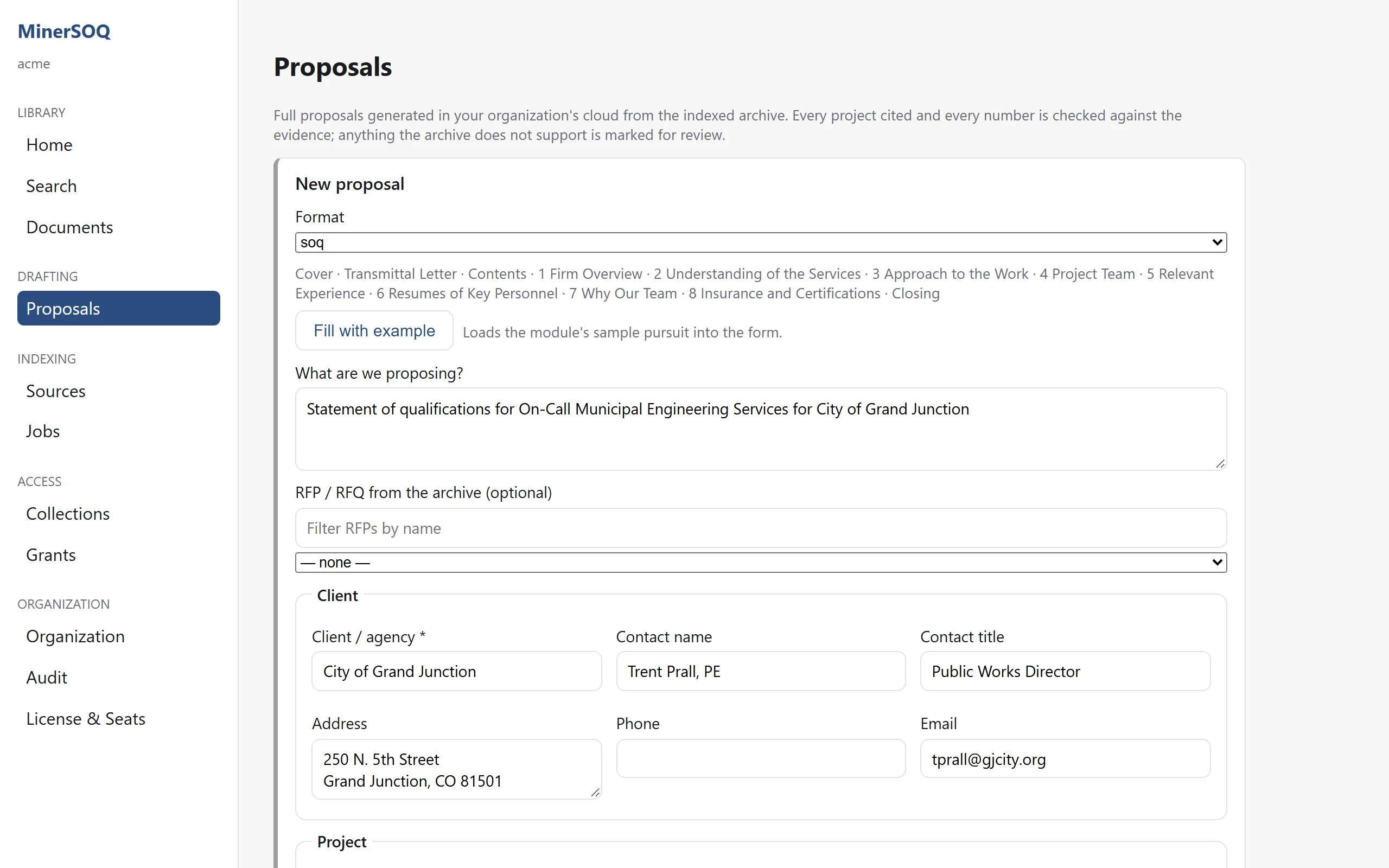
Statement of qualifications

The on-call, qualifications-based selection shape. No fees — the transmittal names the firm’s strongest qualifications for these services, each tied to a cited project.

  1. Cover
  2. Transmittal letter
  3. Contents
  4. Firm overview
  5. Understanding of the services
  6. Approach to the work
  7. Project team
  8. Relevant experience — one subsection per reference project
  9. Resumes of key personnel — one per team member
  10. Why our team
  11. Insurance and certifications
  12. Closing

You supply

  • client
  • project
  • team
  • reference projects
  • subconsultants
  • signatory

Answers an RFP

RFP response

The full response with numbered sections that mirror the RFP’s required items, through to hourly rates, reimbursables and the insurance certificate.

  1. Cover
  2. Transmittal letter
  3. Contents
  4. General information
  5. Project understanding
  6. Project approach — one subsection per task
  7. Proposed project team
  8. Relevant experience — one subsection per reference project
  9. Resumes of key team members — one per team member
  10. Schedule
  11. Additional information
  12. Total consultant cost — hourly rates and reimbursable costs
  13. Insurance certificate

You supply

  • client
  • project
  • due date
  • tasks
  • team
  • fee basis
  • validity
  • signatory

Attaches to an agreement

Scope-and-fee exhibit

The structured exhibit that hangs off a master agreement: a header block, then the elements a contract manager expects, ending in signatures.

  1. Proposal information
  2. Project description
  3. Scope of services — one subsection per task
  4. Project understanding, assumptions and exclusions
  5. Time of performance
  6. Client’s responsibilities
  7. Deliverables
  8. Compensation — hourly rate schedule and reimbursable expenses
  9. Attachments
  10. Terms and conditions; insurance
  11. Signatures
  12. Accepted

You supply

  • client
  • project
  • tasks
  • fee basis
  • signatory
The New proposal form in the console with the statement-of-qualifications format selected and its section outline listed beneath the selector.
The outline appears as you pick the format; the RFQ you choose from the archive reorders it.

Division of labour

The model writes the prose. The fee table is arithmetic.

Every section is one of two kinds, and the boundary is enforced in code — not by asking nicely.

Written from the evidence

  • Firm overview and approach
  • Project understanding
  • Relevant experience, one project at a time
  • Resumes, from the roster and the archive
  • Transmittal and closing letters

Computed from your inputs

  • Task fees and the fee summary
  • Hours by role and the rate schedule
  • Schedule and milestones
  • Insurance limits and certifications
  • Licence numbers and office addresses

Formats are data

Your house style is a configuration, not a rewrite.

The four outlines ship as data files, not code. Section titles, numbering, page breaks and the instruction each section follows can be adjusted to match how your firm already submits — and a format your firm uses that isn’t listed here can be added the same way.

The RFQ decides

Reordered to mirror the request.

When you pick the RFQ or RFP from the archive, its submittal list is read and the outline is reordered and renamed to match it. A reviewer opening your response finds the sections where their own document said they would be.

Our formats are different

They usually are. Bring one you submit often; matching it is part of the pilot.